
+- Ready to Elevate Your Hustle? Join Our Free Community (https://mrnofluff.com/group)
+-- Forum: Building Your Team (https://mrnofluff.com/group/forum-24.html)
+--- Forum: Other businesses (https://mrnofluff.com/group/forum-36.html)
+--- Thread: Network Notepad Enterprise 1.1.26 (/thread-12234.html)
Network Notepad Enterprise 1.1.26 - rlscorner - 11-24-2026

Description: Includes all the features of Network Notepad Professional Edition plus new controls which enables multiple users to collaborate on network diagrams and a 64-bit option for larger diagrams.
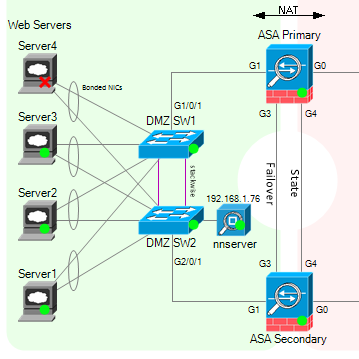
Network Notepad Enterprise Edition Features:
The Enterprise Edition has all the features of the Professional Edition plus new controls aimed at users who need the option of collaborating on diagrams stored on a shared drive (For more information see here), plus a 64 bit option which overcomes memory limitations to allow a 4x larger page size.
Compatibility - It's a major rewrite using Microsoft .NET, so it offers better compatibility and stability with the latest Windows operating systems compared to the freeware edition.
Zoom - Work with and edit diagrams at any zoom level.
Resolution - Draft, Fine and Superfine modes for improved graphics and printing.
Rotate - Rotate text and rotate objects to any angle. Drag-and-Rotate.
Workspace - Supports larger workspace bitmap / larger diagrams.
Multi-page diagrams - Add as many pages to a diagram/ document as you wish and access the pages instantly using the onscreen page tabs.
Custom shapes - Create your own customizable shapes inside of Network Notepad Professional Edition.
Grouping and Locking - Combine two or more objects to make composite objects.
Auto-align links - Can be enabled for a link style or for an individual link so that connection alignment is maintained horizontally and vertically.
Library Search - Find objects in all of your libraries using keywords. Save the result as a new library.
Enhanced Link Styles - New lightning and curve link styles.
Template Diagrams - When you start a new diagram, select from the list of templates to set the page size, orientation, link styles, and any default drawing such as a title block and border.
Unlimited user-defined function "buttons" and an unilimited number of toolsets.
Print Preview.
Release Name: Network Notepad Enterprise 1.1.26
[b]Size:[/b] 6.5 MB
Code:
https://clicknupload.com/o0co5klqrioh/Network.Notepad.Enterprise.1.1.26.rar


https://rapidgator.net/file/e79b6c7a6209b3c44a26317075748030/Network.Notepad.Enterprise.1.1.26.rar.html


https://vikingfile.com/f/EkbGEfCO7f